Case studyProduct design · UX · UI · Web app

Design journeyof BYJU'S Learn.

A visual design language and student dashboard for India's largest online learning program. We started with three guiding principles, listened to a student, a parent and an exam aspirant, and designed a web app that keeps learners moving.

Design principlesUser personasVisual directionDesign systemDashboard UI
learn.byjus.com
BYJU'S Learn student dashboard
Client
BYJU'S
Industry
EdTech
Product
Learn.Byjus.com
Platform
Responsive web app
Users
Students, parents, aspirants
00 Overview

Learning that feels friendly, not formal.

BYJU'S blends engaging video lessons with personalised learning so students practise, learn and understand concepts in depth. The web app had to carry that promise: clear, vibrant and encouraging for a 14-year-old and a 40-year-old parent alike.

Challenge

Three very different users

A grade 8 student, her father checking progress, and a 19-year-old preparing for the IAS exam, all on one platform.

Approach

Principles, then personas

Three guiding principles from the brief, three personas from research, and a visual direction tested against both before any screen was final.

Outcome

A living design language

Brand colours, type, 3D iconography and a component set, applied to the dashboard, bookmarks, subject, class video and empty states.

01 Process

Six steps to a shared direction.

The document was built to put visual thinking in front of stakeholders early, so everyone was on the same page before build.

01

Brief

What BYJU'S stands for.

  • 3 guiding principles
  • Brand personality
02

Research

Who learns, and why.

  • 3 personas
  • Likes, wants, pains
03

Define

Where the product must improve.

  • Journey map
  • Opportunities
04

Moodboard

A direction to react to.

  • 4 trends
  • Design direction
05

System

Reusable foundations.

  • Type, colour, icons
  • Components
06

UI

The screens.

  • Dashboard
  • Subject, video
  • Empty states
Chapter one

Product strategy.

Start with what the brief demands, then turn what users told us into product opportunities.

Guiding principlesBrand personalityProblem statementOpportunities

Imperatives for design from the brief

  1. Nurture young and new talent
  2. Simplify the design to ensure clear communication
  3. Focus on what matters to consumers

Brand personality

ProfessionalFreshVibrantIntellectualGlobalLocal

Audience characteristics

SelectiveCuriousExplorerUp to dateAdamant
Problem statement

Students, parents and exam aspirants all want the same thing from BYJU'S, a clear path to better results, but each one loses that path in a different place.

Insight From pain points to product

Four opportunities the research handed us.

Every persona pain point was grouped, and the four that appeared most became the features the dashboard is built around.

🔖

Save it for later

Bookmark questions, chapter summaries and exam papers by subject, and come back to them.

From: "Unable to save questions to come back to for reference." Prakriti
❓

Ask a doubt, anywhere

A persistent "Ask a doubt" action on every screen, with a short path to a mentor.

From: "Difficulty getting in touch with mentors." Akhilesh
📈

Progress you can see

Concepts completed, time spent and tests attempted on every subject, in plain words.

From: "Language of analytics feels too formal." Prakriti
🎯

A short, clear next step

Take a tour, book a trial class, ask a doubt. One guided path so the main objective never gets lost.

From: "The main objective gets lost in longer videos." Akhilesh
Chapter two

UX design.

The student, the parent and the aspirant: what they like, want and struggle with, and how the product answers.

User personasJourney mapInformation architecture

Prakriti Grade 8 student

Likes
  • Topics taught as 3D models
  • Topics explained with real-world examples
  • Journeys, quizzes and scholarships she can join
Goals
  • Perform well in exams
  • Master Math and Science
Wants
  • A relatable character or cartoon that teaches and stays with her
  • To pick her favourite teachers and rate them
  • To be appreciated, even when told she is wrong
Pain points
  • Can't save questions to come back to
  • Repeated questions in practice marathons
  • Can't find different methods for one math problem
  • Analytics language feels too formal
  • Lacks regular appreciation and encouragement

Akhilesh Parent

Likes
  • 3D visuals help concepts land
  • Content is well organised
  • Learning is fast paced
  • Thinks navigation could improve
Goals
  • Child's overall scores go up
  • Better understanding of Math and Science
Wants
  • An assigned mentor focused on the child
  • Weekly or monthly performance reviews
  • General knowledge, extra-curricular classes and career counselling
Pain points
  • Hard to get in touch with mentors
  • No way to give feedback to the team
  • Main objective gets lost in longer videos
  • Little personal time with the mentor
  • No tailor-made study plan

Rajeev Exam aspirant

Likes
  • Personalised individual learning
  • Experienced mentors
  • Unit tests every 15 days with goal reviews
  • Free support in the final rounds of competitive exams
Goals
  • Clear the competitive exams he is appearing for
Wants
  • Specific study material and topics per exam
  • Help coping with mental stress and pressure
  • To see how other competitors are doing
  • A GK or daily news section
Pain points
  • Can't test his competence against others
  • Hard to find other students' journeys
  • Few resources for motivation
UX Journey map

A week in Prakriti's learning.

The student is the daily user, so we mapped a typical study week and placed a design answer at each dip.

Stage
Log inAfter school
Pick a subjectWhere was I?
Watch & practiseClass video
Get stuckA doubt
ReviewBefore the test
Thinking
"What should I do first today?"
"I was halfway through polynomials."
"Wait, I've seen this question before."
"Who do I ask? Dad's busy."
"Where did I save that question?"
Feeling
Pain point
PAINNo obvious next step
PAINProgress hidden
PAINRepetition, formal analytics
PAINMentor hard to reach
PAINNothing saved
Design answer
ANSWERGuided tour: tour, trial class, ask a doubt
ANSWERSubject progress cards on the dashboard
ANSWERChapter list with "learn again" and "start learning"
ANSWER"Ask a doubt" on every screen
ANSWERBookmarks by subject and type

UX Information architecture

Everything is one click from the sidebar.

A fixed left rail holds the five places a learner goes. Subjects branch into chapters, chapters into videos, tests and doubts.

DashboardWelcome · tour · subject progress · videos
My subjectsProgress per subject
ChapterPolynomials, 04/21
Class videoWatch, rewind, speed
Take a testPractice questions
BookmarksSaved by subject
QuestionsAsk a doubt
Chapter summaries
Exam papers
Ask a doubtMentor help
FAQClarify your doubts
Mentor reply
Live classesBook a trial
Trial classBook your class today
What's newConceptual clarity
ProfilePriya · 10th grade
Download app
Notifications
Chapter three

Our ideas.

Gradients, 3D icons, a colour for every subject and a balanced layout. The components below are live.

MoodboardDesign directionTypefacesColoursIconographyComponentsAccessibility
UI Design direction

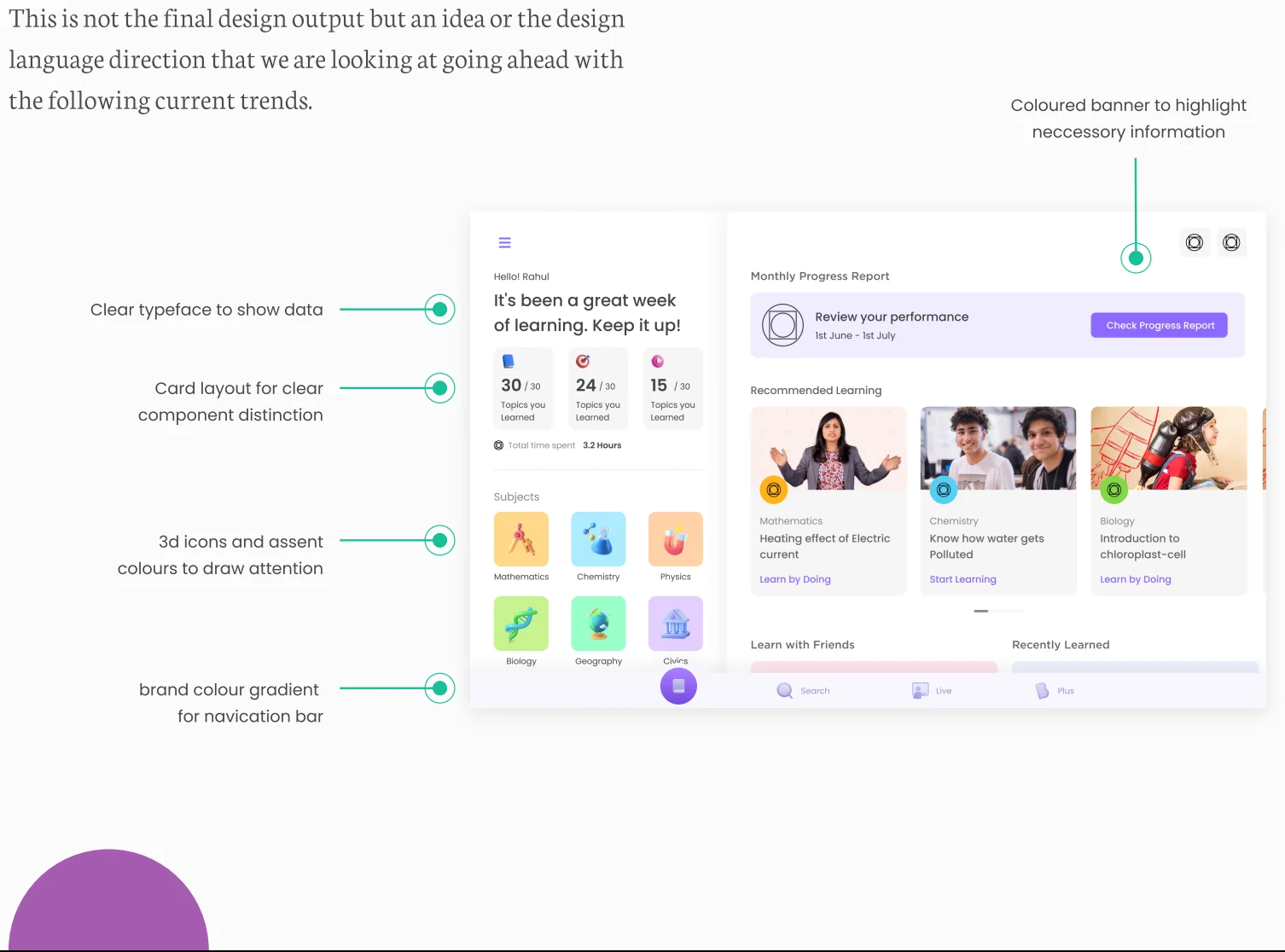
Not the final design, but the direction.

An annotated concept we put in front of stakeholders: a clear typeface for data, cards for component distinction, 3D icons and accent colours to draw attention, and the brand gradient on the navigation bar.

Annotated design direction for the BYJU'S dashboard
UI Typefaces

Poppins to lead, Lora to explain.

A geometric sans for interface and headings, a readable serif for longer descriptions. Students read a lot on this product.

Primary · Poppins
AaABCDEFGHIJKLMNOPQRSTUVWXYZ
abcdefghijklmnopqrstuvwxyz
1234567890

Rounded, geometric and friendly. Used for navigation, headings, buttons, numbers and labels.

Secondary · Lora
AaABCDEFGHIJKLMNOPQRSTUVWXYZ
abcdefghijklmnopqrstuvwxyz
1234567890
Comprehensive learning programs and classes for all students

BYJU'S operates an online learning platform with original content, watch-and-learn videos, rich animations and interactive simulations for its users.

UI Vibrant colours

Purple for the brand, a colour for every subject.

Typography governs; colour gives life. Purple carries the brand and the primary action. Each subject gets its own accent so a student always knows where they are. Click to copy.

Mathematics
Physics
Chemistry
Biology
Civics
Geography
UI Iconography

Gradient and 3D icons.

Materials, rendering and gradients give icons room for creativity, help the product stand out and grab attention. Here as live CSS, not images.

📘Learn
📁Files
🏆Rewards
🎬Classes
🎁Offers
💡Ideas
UI Components

Built to be used. Try them.

Coded from the dashboard design. Each one shows a state from the screens.

Guided tourClick a step

Welcome Priya Get started with the subject you love

✓Take a tour
2Book a trial class
3Ask a doubt

One path with three steps. The line fills as each is done, so the "next thing" is never a question.

Subject progressClick

Progress bars fill on first view. Accent colour tells the subject before the label does.

Chapter listHover
04/21Concepts completed
3h 21mTime spent
05/20Tests attempted
1Polynomial definitionLearn again
2Degree of a polynomialLearn again

Done chapters say "learn again", the next one says "start learning". Plain words, no percentages.

Bookmarks & empty stateDelete
Which of the following is home to the Somali pastoral community?24/08/2021 · Ask a doubt
What makes heat rise?24/08/2021 · Chapter summary
Which of the following substances is a solid?24/08/2021 · Chapter summary
📌No bookmarks to show yetYou have not bookmarked any questions yet.

Delete all three to see the designed empty state. Empty states tell you what to do next, not just that nothing is here.

Class videoClick play
▶Polynomial definition · 6:32 / 8:00

The player keeps related actions beside it, so finishing a video leads straight to a test.

Ask a doubtType · submit
Clarify your doubts and view our FAQs.

Available on every screen. A doubt gets an acknowledgement at once, then a mentor. Demo only.

UI Accessibility

Vibrant, and still readable.

A colourful product for young learners still has to pass WCAG 2.2. We checked every pair, and the brand violet needed one small shift for small text.

Aa
9.7:1AAA
Charcoal on white · body text
Aa
6.9:1AAA
White on brand purple · nav rail
Aa
4.4:1Large only
White on violet · fails for 14px labels
Aa
6.8:1AA
White on ink violet · buttons
✓

The rule: violet #7F5CF4 stays for icons, fills and large headings. Buttons and small labels use ink violet #5B3BD9, which passes AA and still reads as the same brand.

Chapter four

UI design.

Scroll through the dashboard. Each section answers one of the four opportunities.

learn.byjus.com/dashboard
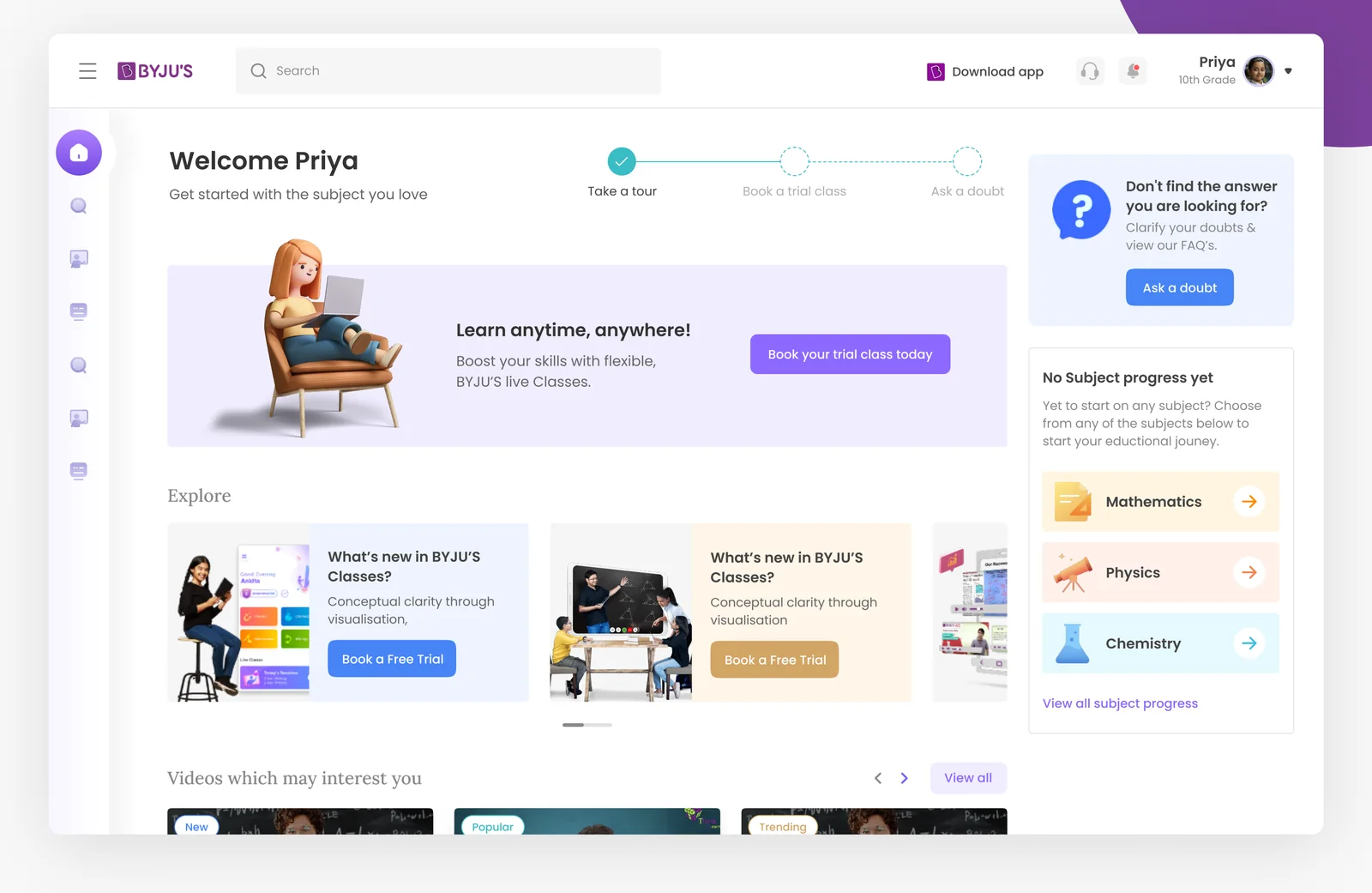
Full dashboard design
01 · Welcome

A greeting and a path.

"Welcome Priya" with the three-step tour right beside it. Take a tour, book a trial class, ask a doubt.

Why: the first thing a student sees is what to do next, not a wall of content.
02 · Learn anywhere

One banner, one offer.

Boost your skills with flexible live classes. A single illustrated card with a single action, "Book your trial class today".

Why: trial classes are the business goal, so they get the most visual weight above the fold.
03 · Subject progress

Where was I?

Mathematics, Physics and Chemistry with their accent icons, and an honest empty state when nothing has started.

Why: Akhilesh wanted to see progress; Prakriti wanted it in plain words. Both get it here.
04 · Videos

New, popular, trending.

Videos which may interest you, sorted the way students actually browse, with "what's new in BYJU'S classes" cards above.

Why: discovery keeps the fast-paced learning Akhilesh liked, without the main objective getting lost.
Screens Inner pages

The same system, four more screens.

Bookmarks, subject chapters, class video and the empty state, all built from the same rail, cards and accent colours.

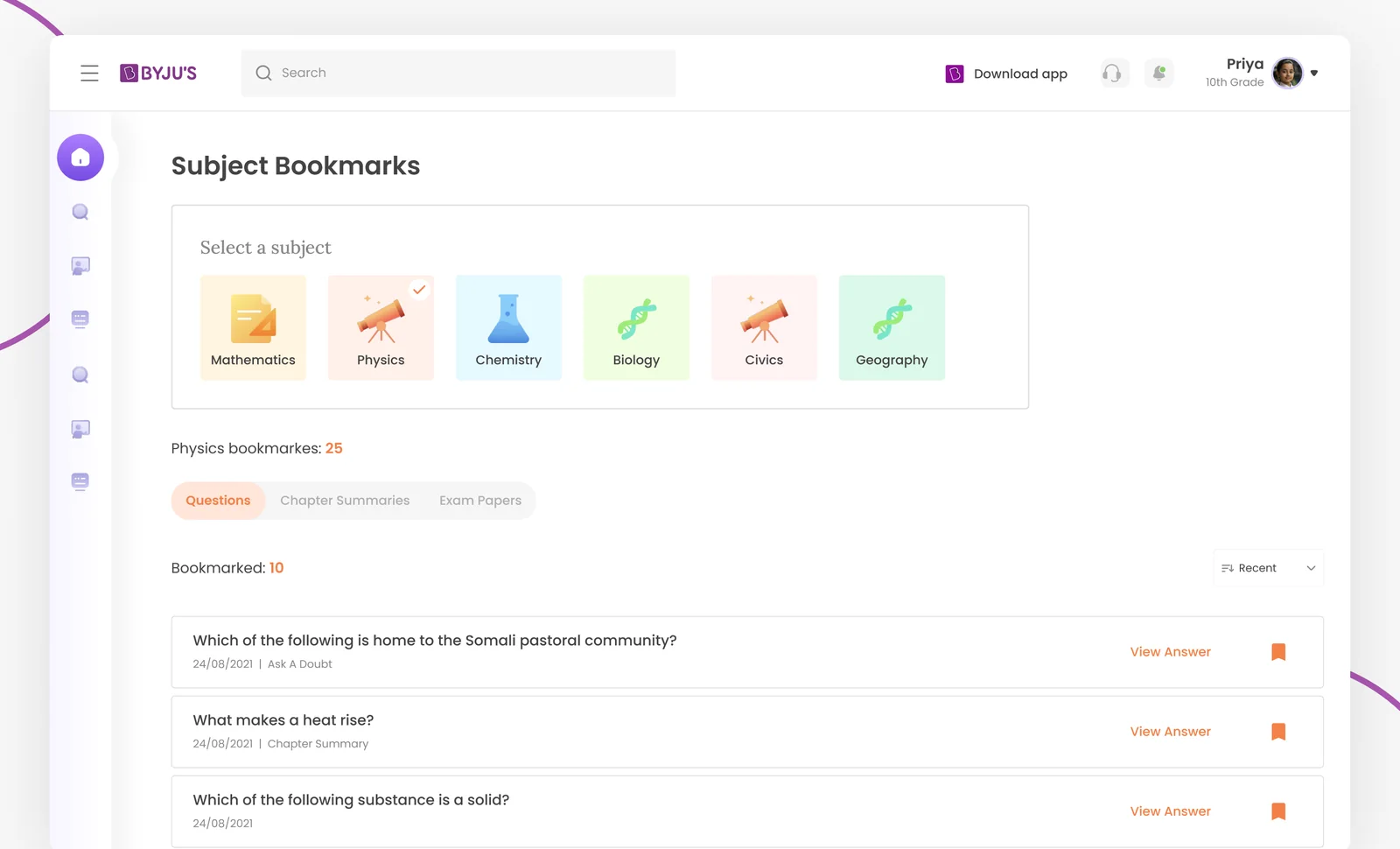
/bookmarks
Bookmarks screen
Bookmarks. Pick a subject, filter by questions, chapter summaries or exam papers, and view the answer in place.
/subjects/mathematics/polynomials
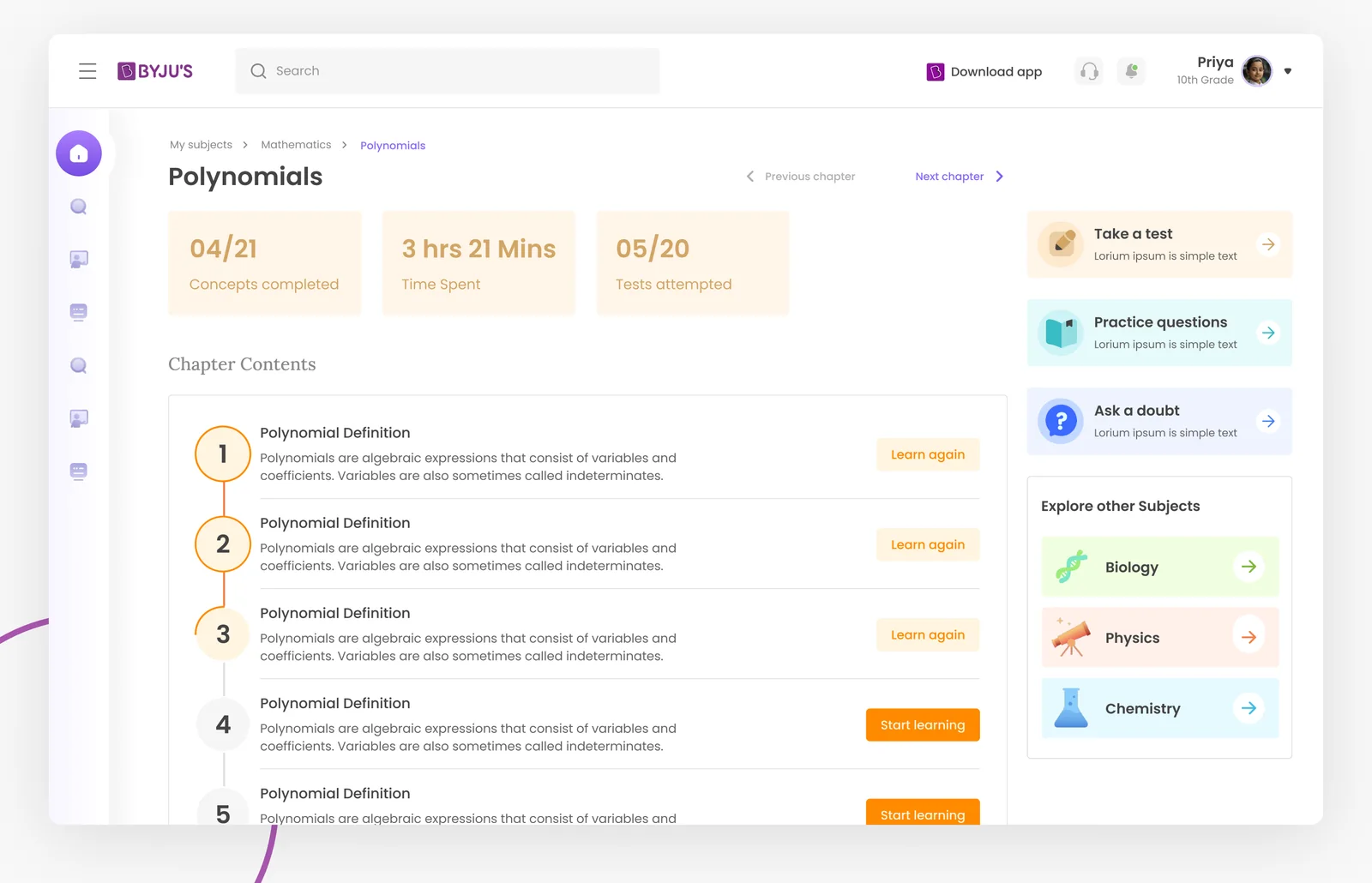
My subject screen
My subject. Concepts completed, time spent, tests attempted, then the chapter list with "learn again" and "start learning".
/class/polynomial-definition
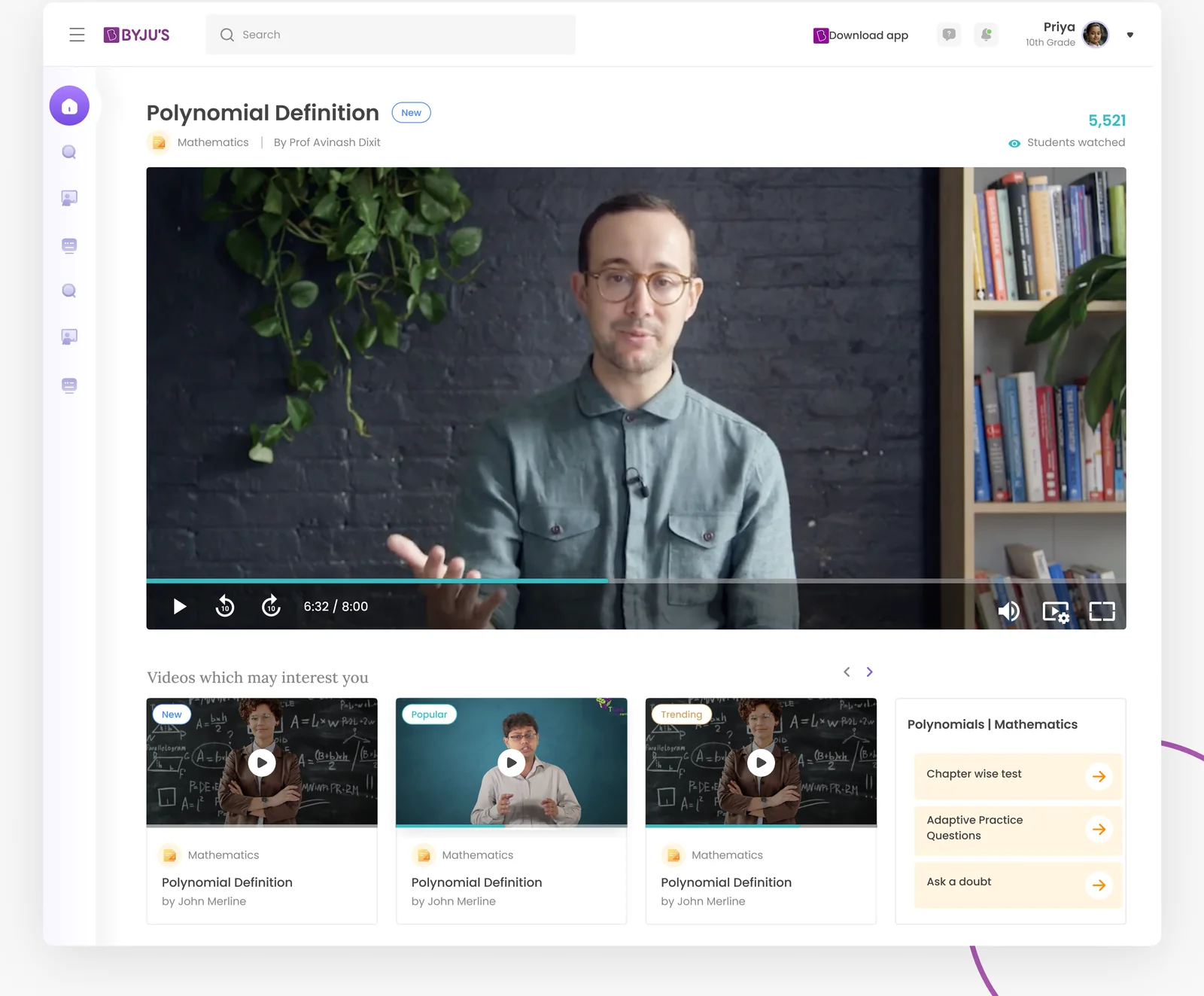
Class video screen
Class video. The lesson, related videos and the chapter-wise test, adaptive practice and ask a doubt beside it.
/bookmarks (empty)
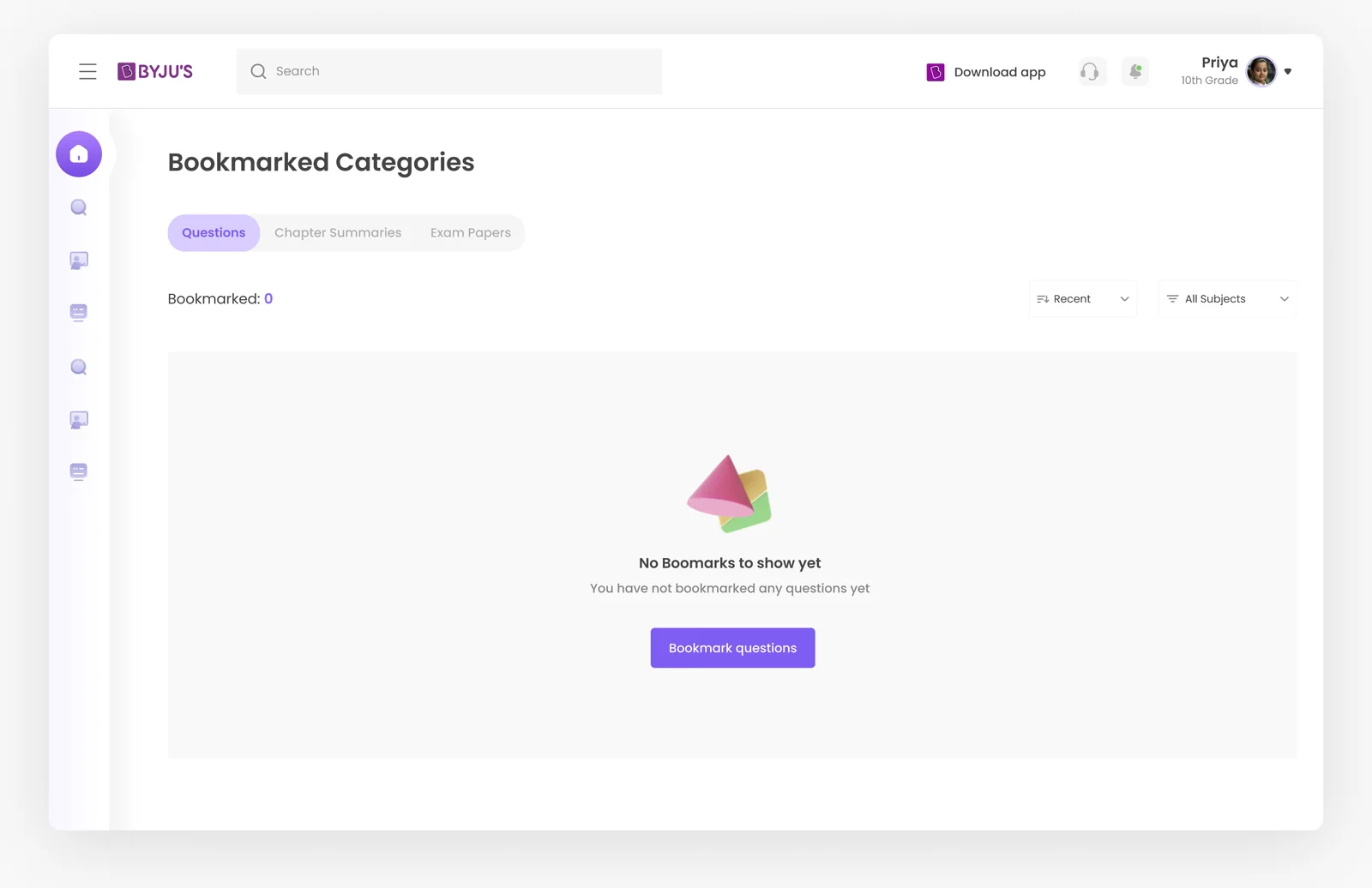
Empty state screen
Empty state. No bookmarks yet, with an illustration and a button that explains what bookmarking does.
05 Outcome

Everyone on the same page.

A starting point for the visual language, shared with stakeholders before build. Design is iterative, and this gave the team one direction to iterate from.

Product

Strategy

  • 3 guiding principles from the brief
  • Brand and audience traits
  • 4 research-led opportunities
UX

Structure

  • 3 personas: student, parent, aspirant
  • Weekly journey map
  • Sidebar-first information architecture
UI

Interface

  • Type, colour and 3D iconography
  • Component set with states
  • 5 dashboard screens
What we learned
Parents read the dashboard tooProgress had to make sense to a 40-year-old at a glance, not just a 14-year-old.
Empty states are onboarding"No bookmarks yet" became the place to explain what bookmarks are for.
Colour needs a jobOne colour per subject did more for wayfinding than any label.

More work from the studio

A few other projects we've designed and built.

Explore more works

Got an idea?

Let’s build something worth noticing

Let’s talk